Product map

Aircraft maintenance software organized around the operational handoff.

Explore the maintenance workflows visible in Airways and the product questions worth resolving in a walkthrough.

Original source screenshot

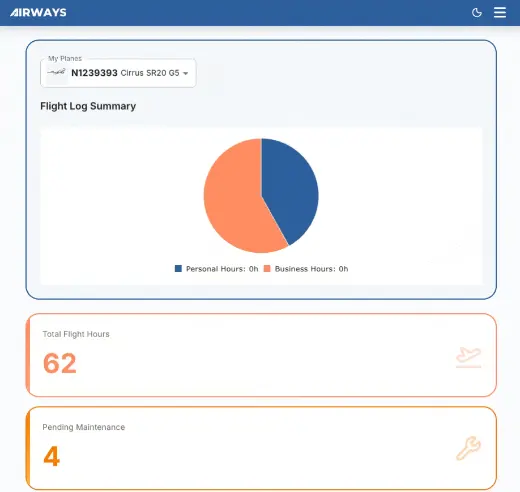
The Airways dashboard leads the product story.

The original source interface includes aircraft selection, flight activity, pending maintenance, scheduled appointments, and an upcoming-maintenance table. Exact behavior, integrations, permissions, and availability should be confirmed against your operation.

Prepare a walkthrough
Airways control surface Original source screenshot
Airways dashboard showing flight hours, pending maintenance, scheduled appointments, and upcoming maintenance
Screenshot and optional animation from the original Airways source repository.

Product surfaces

Five control points for maintenance operations

These describe the product direction shown in the source interface, without turning unverified roadmap or implementation details into promises.

01

Aircraft context

Keep the maintenance view attached to the aircraft.

Start from an aircraft selector and a consolidated operating view instead of rebuilding identity and status across separate trackers.

02

Due work

Review upcoming maintenance in one queue.

Bring approaching inspection and maintenance items into view with the basis and timing needed for a planning conversation.
03

Flight activity

Keep utilization near maintenance planning.

Use flight-log context to inform hour- and cycle-aware maintenance reviews. Confirm available entry and import methods during evaluation.
04

Open work

Connect maintenance needs with accountable action.

Carry identified work through scope, assignment, status, and closure without detaching it from the aircraft record.
05

Record handoff

Make completed work useful to the next person.

Retain maintenance context and supporting material in a shared history that can be reviewed during future planning.

Fit check

Evaluate Airways with your actual maintenance workflow.

Product evaluation

Bring your real maintenance workflow to the walkthrough.

Review the product against your aircraft, roles, records, and handoffs. Confirm current capabilities, implementation fit, and commercial terms directly with Airways.

By submitting, you agree that Airways may use these details to respond to your request. See the privacy notice.